
WhatsApp Flows
WhatsApp has developed actions that can be executed within conversations using simple and engaging templates to encourage action and enhance the user experience with speed and immediacy. Increased acceptance!
WhatsApp Flows is designed for practical use cases with a clear call-to-action (CTA) to drive conversions and generate new leads. A wide variety of options are available to create templates and automate conversations, transforming the user experience and boosting conversions: text, images, embedded links, subscription features, date selectors, and forms (including text input fields, dropdown menus, checkboxes, and radio buttons).
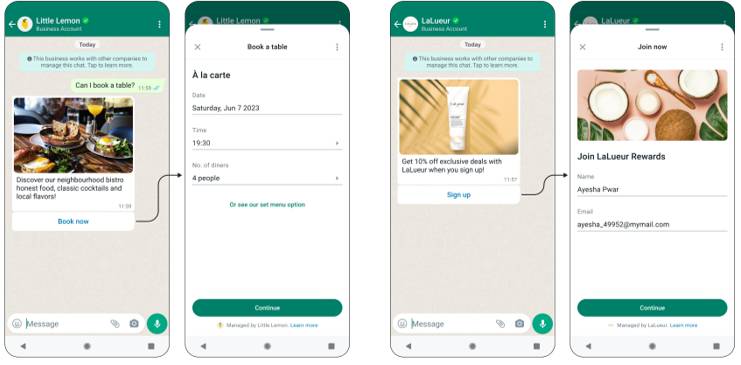
Use Cases
- Reservation Management
- Log In
- Choose a Product / Service
- Obtain Customer Feedback
- Event / Promotion Registration
FAQ
How many screens can a flow have, and where does the data the
user fills in end up?
user fills in end up?
WhatsApp Flows allow you to capture structured data through dynamic, multi-screen forms built directly inside the chat.
- Maximum Screens: Meta recommends keeping workflows between 3 to 10 screens for optimal completion rates, though complex flows can contain additional screens provided the total Flow JSON blueprint remains under the 100 KB size limit.
- Supported Input Fields: Form components include text inputs (short/long text, email, phone numbers, numeric fields), selection controls (dropdown menus, single-select radio buttons, multi-select checkboxes), date/time pickers, and media display elements.
- Data Destination & Retention: Upon completion, user submissions are encrypted and transmitted as a structured JSON payload (nfm_reply) directly to your registered Webhook endpoint or indigitall platform. Meta does not retain submitted form entries on its servers once delivered; data persistence is managed entirely within your connected backend system or CRM according to your organization's privacy policies.
Updated about 2 months ago