
Events Management
In the indigitall platform, Events represent specific actions or milestones performed by your users (such as completing a purchase or abandoning a cart). These events act as the engine for your automation strategies; they can be used to initiate a Customer Journey or serve as real-time triggers for specific actions within an active journey.
To make this instantaneous, real-time automation possible, the Customer Data Platform (CDP) doesn't just log that an action occurred, it captures and stores a structured data payload at that exact moment.
To access this section, navigate to Tools > Customer Journey > Events from the main menu.
Events Dashboard
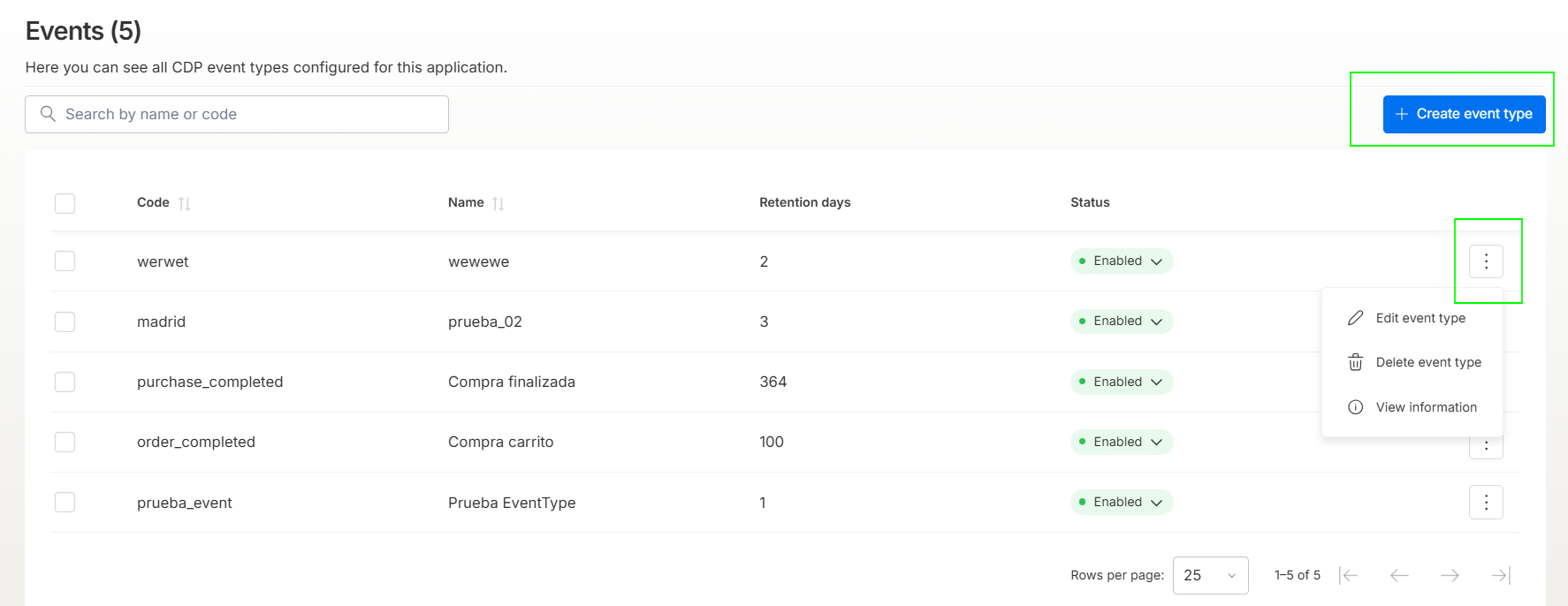
The main dashboard provides an overview of all Customer Data Platform (CDP) event types configured for your application. From this view, you can search, monitor, and manage existing events.
- Search Bar: Quickly look up any event using its unique Name or Code.
- Code: The technical identifier used by developers and APIs to trigger the event (e.g., purchase_completed).
- Name: The user-friendly display name of the event visible within the platform.
- Retention Days: The number of days the platform stores the historical data of this event before it expires.
- Status: Indicates whether the event is currently active (Enabled) or inactive.
Clicking the three vertical dots (options menu) on the right side of any event row unlocks the following management capabilities:
- Edit event type: Modify the existing parameters, names, or retention settings of the event.
- Delete event type: Permanently remove the event type from your application configuration.
- View information: Open a read-only detailed view of the event's attributes and historical setup.
Creating a New Event
To set up a new event tracker, click the blue + Create event type button in the top right corner of the dashboard. A configuration modal will appear.
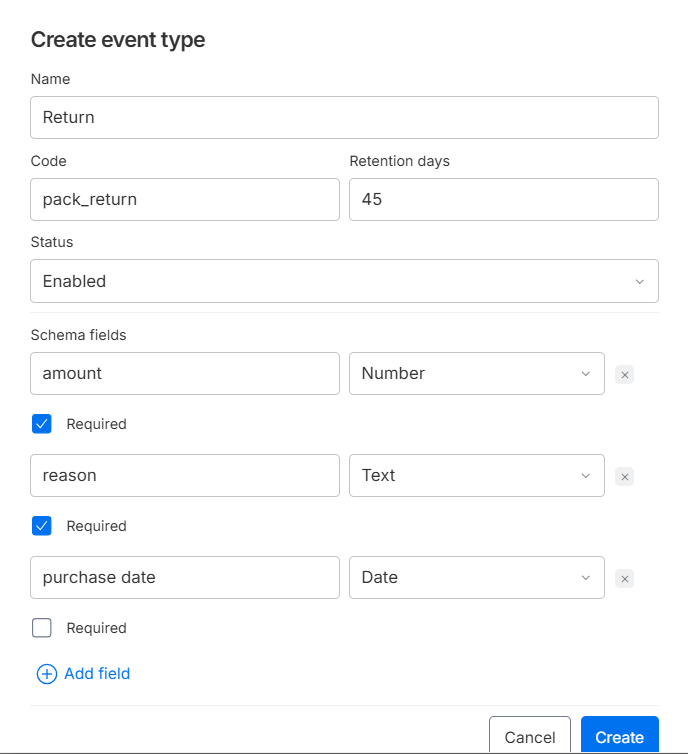
Fill out the basic information required to register the event structure:
- Name: Enter a descriptive, human-readable name for the event (e.g., Return). This is how your marketing team will identify the event when building Customer Journeys.
- Code: Assign a unique identifier (e.g., pack_return). This code must exactly match the payload sent via the indigitall SDK or API tracking methods.
- Retention days: Define the lifespan of the event data by entering the number of days you want this information stored in the CDP (e.g., 45 days).
- Status: Determine the operational availability of the event using the dropdown menu. You can choose between:
- Enabled: The event is active and ready to collect data and trigger journeys immediately.
- Disabled: The event is paused or inactive, preventing it from recording new actions or triggering automations.
Events often carry context-specific data packages called Schema fields. These properties let you personalize your Customer Journeys based on the exact details of the action taken.
For each schema property you want to track, define the following variables:
- Field Name: The lowercase technical identifier for the attribute (e.g., amount, reason, purchase date).
- Data Type Dropdown: Select the format of the incoming data from the dropdown menu. You can configure each field as one of these four options:
- Text: For alphanumeric strings or text descriptions (e.g., the reason for a return).
- Number: For numeric values, amounts, prices, or quantities (e.g., the total value in amount).
- Boolean: For binary true/false flags.
- Date: For specific calendar dates independent of system logging (e.g., the original item purchase date).
- Required Checkbox: Check this box if the event should fail to process if this specific data point is missing. If left unchecked, the field is considered optional for the CDP.
Click + Add field to dynamically expand your event schema with as many properties as your data strategy requires.
Once you have completely defined your event structure, click Create to save the event type in the CDP and make it immediately available for use in your Customer Journeys.
Updated 4 months ago