
How to Log In
To secure your account and protect user data, logging into the indigitall Contact Center requires a two-step verification process (2FA).
Follow the steps below to access the platform:
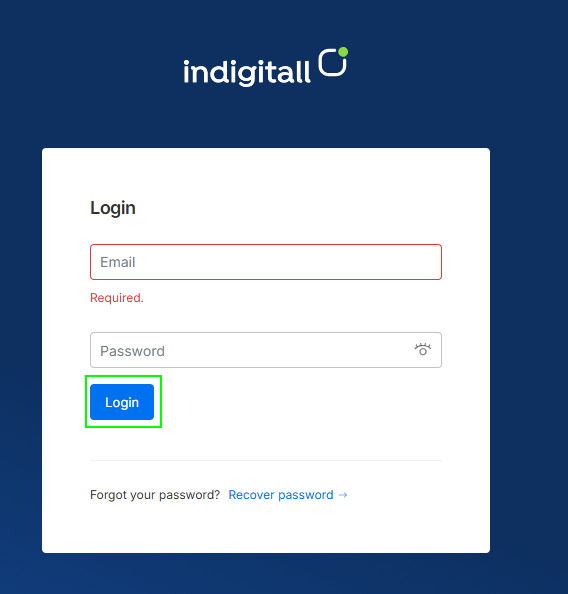
Enter Your Credentials
- Go to the login page.
- Enter your registered email address in the Email field.
- Enter your password in the Password field.
- Click the Login button.
Forgot your password?
If you cannot remember your password, click the Recover password link located at the bottom of the login box to start the password reset process.
Two-Factor Authentication (2FA)
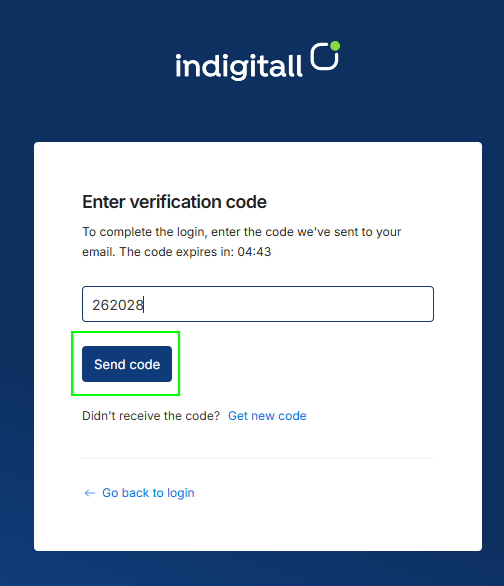
After submitting your valid email and password, a security screen will prompt you for a verification code.
- Check your email inbox for a message containing a 6-digit verification code.
- Enter the code into the Enter verification code field.
- Click Send code to log into the system.
Note: For security purposes, verification codes are time-sensitive and expire after a short period (indicated by the on-screen countdown timer).
Need Help or Didn't Receive the Code?
- Request a new code: If you didn't receive the email, or if the code expired before you could enter it, click Get new code next to "Didn't receive the code?".
- Change account details: If you entered the wrong email address, click Go back to login to return to the main login screen.
Updated 3 months ago
Did this page help you?