
2026 Messaging Strategy & Policy Compliance
Meta’s ecosystem has shifted from simple delivery to high-intent engagement. This section outlines the current regulatory landscape and the latest features designed to maximize your ROI.
-
Be Specific About Content
Users should know exactly what they are signing up for. If they opted in for Order Updates, sending them Promotional Offers is a violation that often leads to spam reports.
Recommended
- Correct: "Check this box to receive shipping updates and exclusive weekly offers via WhatsApp."
To avoid
- Incorrect: "Check here to stay in touch."
-
Respect the Opt-out
- Meta now prioritizes the user's ability to stop receiving messages.
- Include a Clear Exit: Always include an Unsubscribe or Stop button/keyword in your templates.
-
Maintain High Quality Ratings
- Meta assigns a Quality Rating (Green, Yellow, Red) to your phone number based on how users interact with your messages over the last 7 days.
- High Block Rate: If many users select Report Spam or Block, Meta will automatically lower your messaging tier (e.g., from 100k messages/day down to 10k).
- Monitoring: Regularly check your Quality Rating.
-
Avoid Cold Messaging
Never purchase database lists. Sending messages to users who have never interacted with your brand is the fastest way to get your WABA ID blacklisted.
Opt-in Management & Compliance
To send marketing or utility campaigns via WhatsApp, Meta requires you to obtain explicit consent (Opt-in) from your customers. As of 2026, Meta’s enforcement policies regarding user experience are stricter than ever. Failure to manage consent properly can lead to high Block Rates, which will result in your WABA being flagged or permanently banned.
- What is a Valid Opt-in?
An opt-in must be a deliberate action taken by the user. It cannot be assumed or hidden in lengthy Terms and Conditions. The opt-in must clearly state that the user is agreeing to receive messages from your business via WhatsApp.
-
Recommended Opt-in Methods
- Website Forms: A checkbox on a lead generation form or during the checkout process.
- SMS: Inviting users to continue a conversation on WhatsApp via a text link.
- QR Codes: Printed on packaging or physical signage that triggers a User-Initiated message.
- WhatsApp Click-to-Chat Ads: Users clicking an ad to start a conversation with your brand.
The U.S. Market Landscape (+1 Country Code)
The policy enacted in April 2025 remains the standard: Marketing messages to U.S. phone numbers are currently restricted. Meta continues to prioritize consumer experience in the U.S. by pausing outbound marketing templates to prevent spam.
- Strategic Pivot: Focus your U.S. efforts on Utility and Authentication flows, which remain fully operational and maintain industry-leading open rates.
Optimizing Your Messaging Limits
The "Per-Message" counting logic is now the universal standard. To maintain high-volume sending status, you must master the 24-hour service window:
- Every outbound marketing message counts toward your limit.
- The Optimization: Once a customer replies, you enter a "Service Session." Any marketing messages sent within the next 24 hours are quota-free.
- Tactical Tip: Design your templates with engaging "Quick Replies" to trigger early user interaction, effectively unlocking unlimited messaging for the remainder of that session.
Interactive Visuals: Tappable Preview Headers
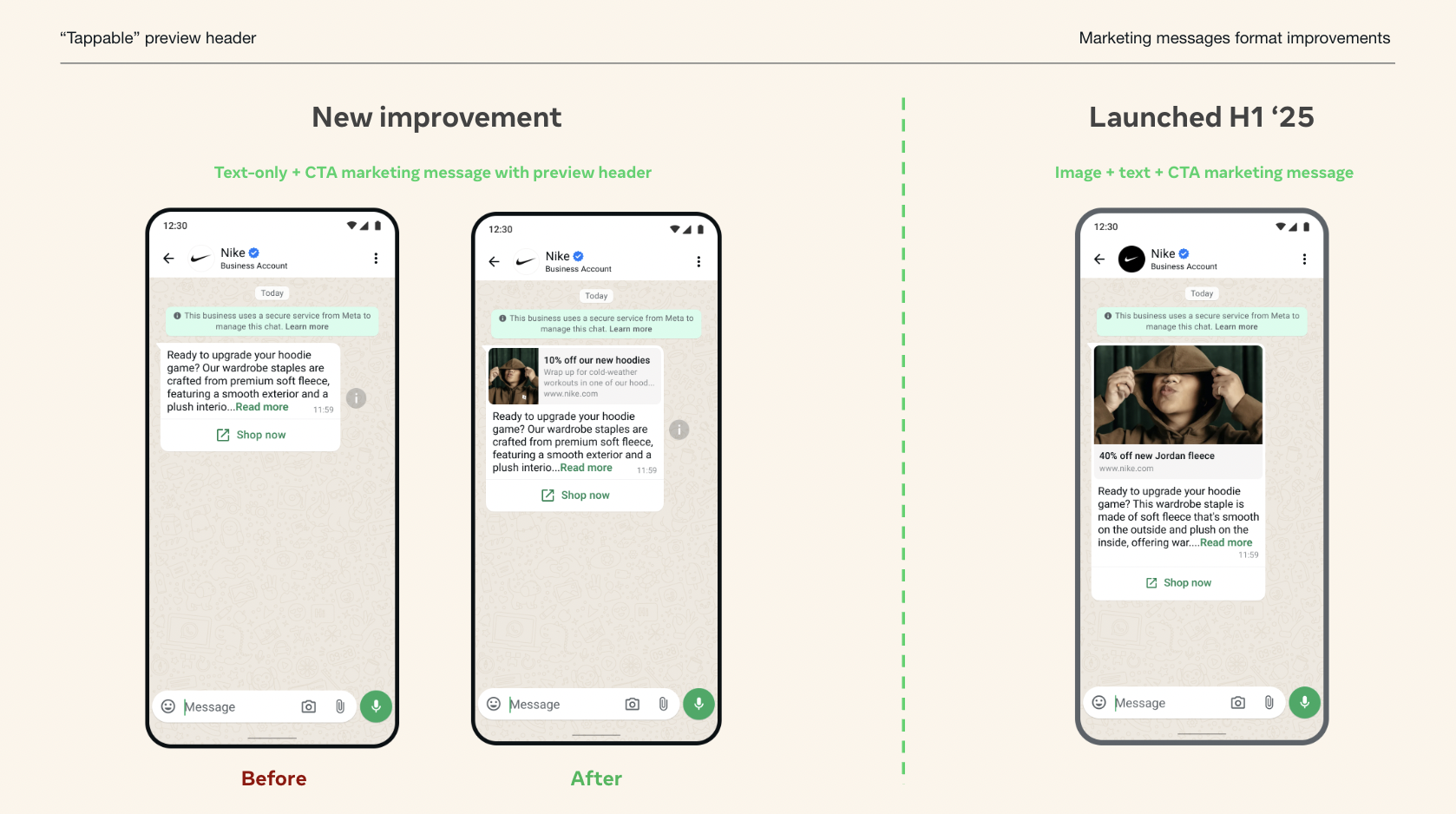
Meta has fully integrated the enhanced preview headers for both image-based and text-only messages. These are no longer static snippets but fully interactive entry points to your conversion funnel.
- Preview Capability: Customers can now see a website thumbnail in the preview header, helping them assess the destination's relevance before clicking.
- Enhanced Navigation: The entire preview header is now tappable, offering an additional seamless way for people to reach the CTA destination.
These updates are being applied automatically to all applicable marketing messages, no implementation or integration is required. The new preview header is available for the following formats, supporting both static and dynamic links:
- Single image + text + URL links in the CTA button.
- Text only + URL links in the CTA button.
Finally, Meta is introducing a new API that allows businesses to customize the website title shown in the preview header for maximum relevance.
Mastering CTR with Custom Preview Titles
Don't settle for generic URLs. Since the entire header is now tappable, your preview title is your most effective Call-to-Action.
- Be Action-Oriented: Replace indigitall.com/offers with "Exclusive: Claim Your 25% Anniversary Discount!"
- Personalization at Scale: Use the website_title parameter to include the customer’s name (e.g., "John, your personalized plan is ready").
- Verified Impact: Data shows that custom titles increase Click-Through Rates (CTR) by an average of 18-22% compared to standard link previews.
Updated 6 months ago