
CDP / Internal Events
Internal CDP events are recorded automatically every time a contact interacts with a message sent through indigitall. No configuration is required: once a campaign is sent through any supported channel, indigitall immediately starts logging the corresponding events on the contact’s profile.
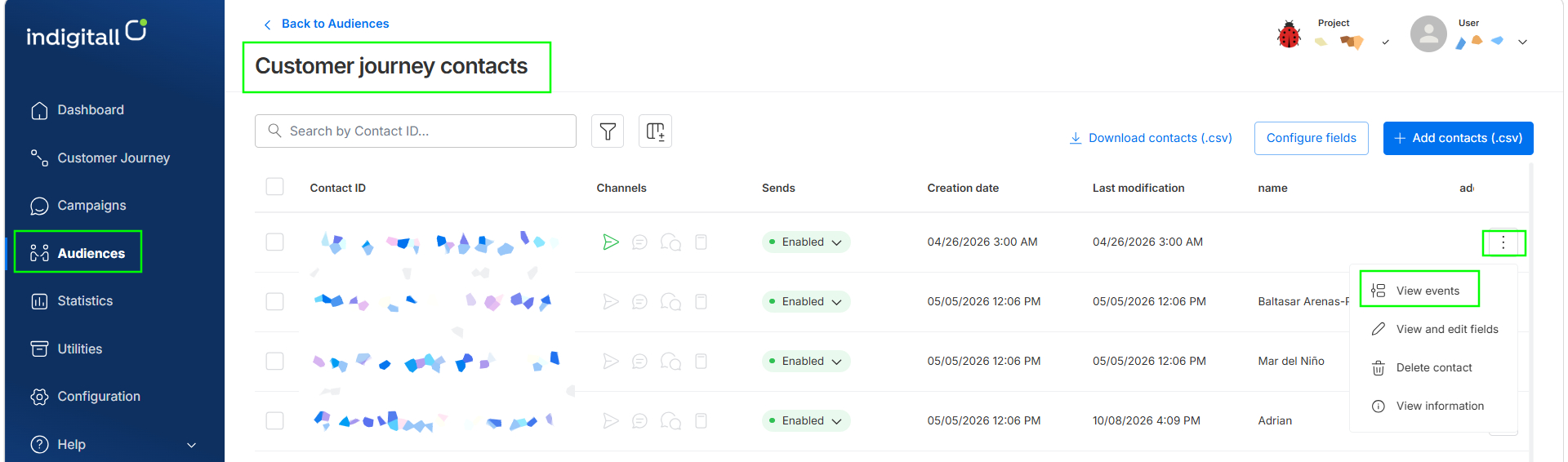
Events are stored for 365 days and are accessible from Audiences → Customer Journey → View Journey Contacts. In the contacts list, click the three-dot menu (⋮) on the right side of any contact row and select View events. Use the date filter (for example, View last year) to choose the time range.
Channels and available events
Each channel generates its own set of events. The table below lists all internal events, with their exact codes as they appear in the CDP.
| Channel | Event code | Description | Extra field |
|---|---|---|---|
| email.send | Message delivered to the recipient | — | |
| email.open | Recipient opens the email | — | |
| email.click | Recipient clicks a link | url (link URL) | |
| email.hard-bounce | Permanent bounce (invalid address) | — | |
| email.soft-bounce | Temporary bounce (full mailbox, server down) | — | |
| email.blocked | Email blocked by the provider | — | |
| email.spam | Recipient marks the email as spam | — | |
| Push | push.send | Notification sent to the device | platform (iOS / Android / Web) |
| Push | push.click | Contact taps the notification | platform (iOS / Android / Web) |
| SMS | sms.send | SMS sent to the contact | — |
| SMS | sms.click | Contact clicks the link in the SMS | url (link URL) |
| Chat | chat.sent | Message sent via the chat channel | — |
| Chat | chat.delivered | Message delivered to the device | — |
| Chat | chat.read | Contact reads the message | — |
| Chat | chat.error | Error sending the message | — |
Event fields
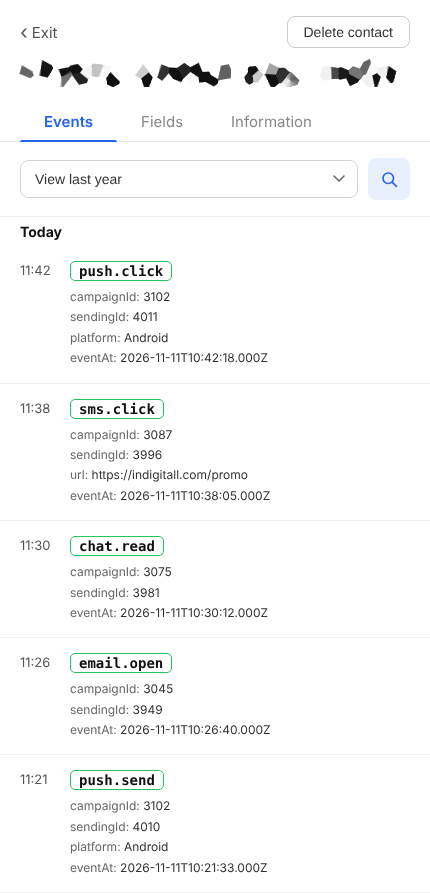
Events appear in reverse chronological order (newest first), and every internal event includes the following base fields:
- campaignId (number): ID of the campaign that triggered the event.
- sendingId (number): ID of the specific sending within the campaign.
- url (string): Contains the exact URL the contact clicked. (Only included in email.click and sms.click).
- platform (string): Indicates the device platform: iOS, Android, or Web. (Only included in push.send and push.click).
- eventAt (datetime): The exact date and time of the event, in UTC (ISO-8601).
Use cases
Internal events feed three core CDP capabilities:
- Unified contact profile. Every channel interaction (opens, clicks, bounces, reads) is recorded in a single timeline per contact, giving you a complete cross-channel view of engagement.
- Segmentation. Use event data to build dynamic segments. For example: contacts who clicked an email link in the last 30 days, or contacts who received a push but never clicked it.
- Channel-reactive journeys. Trigger Customer Journey flows based on internal events. For example: send a follow-up SMS to any contact whose email hard-bounced, or start a re-engagement push campaign when a contact hasn’t opened an email in 60 days.
Because events are recorded automatically and stored for 365 days, they are available as journey triggers and segmentation criteria from day one, with no additional instrumentation required.
Updated about 21 hours ago