
BIMI
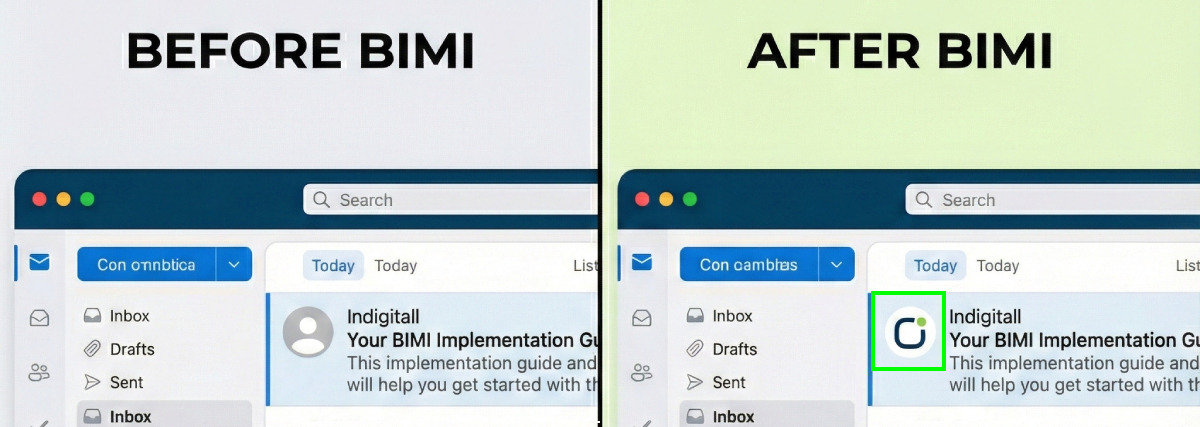
BIMI (which stands for Brand Indicators for Message Identification) is a powerful email specification. Developed by the AuthIndicators Working Group starting in 2015, BIMI allows brands to display their official logo next to their messages in a recipient's inbox.
When properly implemented, this feature enhances brand visibility and instills trust, though it currently only works with email clients that support the specification.
Email Client Support for BIMI
A wide range of global and regional email providers currently support BIMI. The list of compatible clients includes:
- Gmail
- Yahoo Mail
- AOL
- FastMail
- Apple Mail
Note on Microsoft: Outlook and Hotmail do not currently support BIMI. While adoption is expected in the future, there is no official confirmation or ETA from Microsoft yet.
VMC Requirements: Gmail’s 2021 adoption of BIMI was a major milestone for the standard, but it also enforced the requirement for a Verified Mark Certificate (VMC). Obtaining a VMC is often cited as the most challenging aspect of BIMI setup.
BIMI Implementation
Now that you understand the value of BIMI, let's walk through the fundamental steps required for adoption. Remember, your internal IT or security teams, or a specialized third-party expert, can always provide hands-on assistance.
Here is a simple seven-step checklist to get you started:
-
Pinpoint Your Sending Domain: Determine the exact domain name used to send your emails. This is the domain where the BIMI DNS record will be published.
-
Solidify Email Authentication: Your domain must have robust email authentication protocols in place. This primarily requires implementing DKIM (DomainKeys Identified Mail) and SPF (Sender Policy Framework)—ideally, use both for maximum security.
-
Establish DMARC Enforcement: You must enforce a strict DMARC policy. This policy cannot be set to p=none; it must be set to either p=quarantine or p=reject. Note that DMARC may require additional configuration steps.
To ensure optimal security and align with BIMI requirements, it's crucial to understand the three available DMARC policy options (denoted by the "p" tag). These policies dictate how recipient mail servers should handle emails that fail DMARC authentication:
- p=none: Monitoring Only. No specific action is taken on failing messages. The decision on how to filter or deliver emails that fail DMARC is left up to the individual mailbox provider. >> Note: This level is insufficient for BIMI implementation.
- p=quarantine: Send to Spam/Junk. This policy instructs recipient mail providers to place messages that fail DMARC authentication into the recipient's spam or junk folder. >> Recommended transition level for testing and monitoring.
- p=reject: Block/Refuse Delivery. This is the strictest level. It tells recipient mail providers to actively block and refuse delivery of all emails that fail DMARC authentication. >> Highest level of protection and required for full BIMI compliance.
-
Prepare the Logo File: Create your official brand logo in the correct format: an SVG (Scalable Vector Graphics) file. For security and compatibility, ensure the file adheres to the SVG Tiny 1.2 format standard.
-
Secure a Verified Mark Certificate (VMC): To display your logo reliably across supported platforms, you must obtain a VMC. This digital certificate verifies your ownership of the trademarked logo. Recognized Certification Authorities (CAs) like DigiCert and Entrust are authorized to issue these.
-
Deploy the BIMI Record: Publish the new BIMI record (a TXT record) on your DNS server alongside your other DNS records. Be sure to verify that the URL pointing to your hosted logo file is accurate.
-
Confirm Functionality: Test your setup to confirm that your logo is successfully appearing in supporting email inboxes. Tools like the free checker from BIMIGroup.org can analyze your domain's records and deployment.
Keep in mind: Due to caching and different client update cycles, it may take several weeks for your logo to display consistently across all supported inboxes.
You have successfully navigated the process! By implementing BIMI, you've not only boosted your brand's presence but also reinforced your email security and deliverability. This valuable effort is sure to be rewarded with improved engagement metrics for your email campaigns.
Updated 11 months ago