
Multimedia
In the Tools / Multimedia section, you can manage and upload the digital assets that will power your chat campaigns. This centralized library ensures that your documents, images, audio, and video files are ready for immediate use.
Managing Multimedia Resources
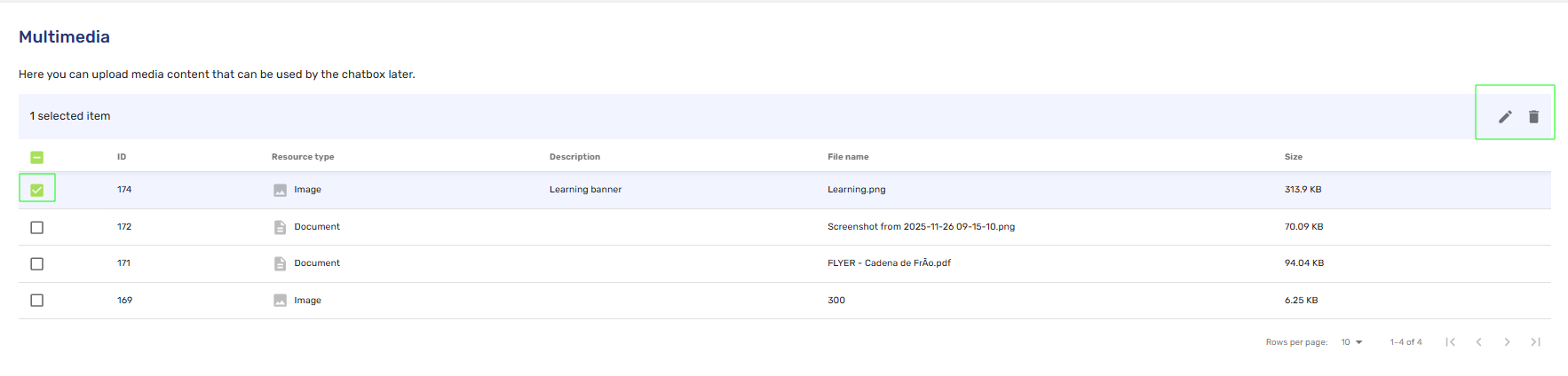
- Centralized Library: The main dashboard displays all stored assets, including their ID, Resource type, Description, File name and Size.
- Quick Actions: You can easily maintain your library by selecting an item to Edit or Delete using the action icons in the top right corner.
Creating a New Resource
When you click to create a new resource, the system provides a flexible upload interface:
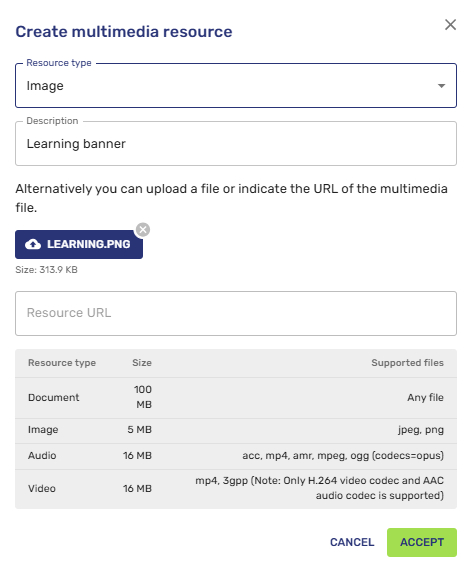
- Resource Type & Description: Define your asset by selecting its type (document, image, audio or video) and providing a descriptive name for easy searching.
- Flexible Uploading: You can either upload a file directly from your device or provide a Resource URL for cloud-hosted content.
- Real-time Validation: The interface displays the size of your uploaded file (e.g., 313.9 KB) to ensure it meets platform requirements.
Technical Requirements
To ensure optimal delivery across all channels, please adhere to the following specifications:
| Resource Type | Max Size | Supported Formats / Notes |
|---|---|---|
| Document | 100 MB | Supports any standard file format |
| Image | 5 MB | jpeg, png |
| Audio | 16 MB | acc, mp4, amr, mpeg, ogg (codecs=opus) |
| Video | 16 MB | mp4, 3gpp (Note: Only H.264 video codec and AAC audio codec are supported) |
Updated 8 months ago
Did this page help you?