
WhatsApp Passthrough Configuration
The Passthrough setup is designed for clients who wish to use indigitall as a delivery gateway while maintaining full control over their own logic and message processing via their own backend.
Compatibility Note: Enabling Passthrough configuration disables the use of the indigitall Contact Center (CC) and AI Agents. This mode is intended for users who manage their own conversation logic.
When Passthrough is active, indigitall acts as a bridge:
- Outbound: You send messages through our API.
- Inbound & Status: We forward user replies and message status updates (sent, delivered, read, error) directly to your configured webhook.
Inbound Messages & Status (Webhook)
To receive real-time updates when a customer sends a message or when the status of an outgoing message changes, you must configure your server to receive payloads from Meta.
The payload structure for incoming messages and status updates follows the standard Meta format. Please refer to the official Meta documentation to ensure your webhook is prepared to handle these requests.
Outbound Messages (API)
To send messages (including text, media, or templates) via the indigitall gateway, you must use our Cloud API. This allows you to trigger communications that will later generate the status updates mentioned above.
You can find the detailed data structure, required headers, and authentication methods in our technical reference.
Implementation Example
To help you visualize the flow, here is an example of a Template Message sent via indigitall and the corresponding Status Update your webhook would receive.
Outbound Request (To indigitall API)
This is the payload you send to our cloudapisendmessages endpoint to initiate a conversation.
{
  "recipient": "34600000000",
  "channel": "whatsapp",
  "type": "template",
  "template": {
    "name": "shipping_update",
    "language": {
      "code": "en_US"
    },
    "components": [
      {
        "type": "body",
        "parameters": [
          {
            "type": "text",
            "text": "Your order #12345 is on its way!"
          }
        ]
      }
    ]
  }
}
Incoming Status Update (To your Webhook)
Once the user opens the message, your webhook will receive a payload following the Meta format:
{
  "object": "whatsapp_business_account",
  "entry": [{
    "id": "WHATSAPP_BUSINESS_ACCOUNT_ID",
    "changes": [{
      "value": {
        "messaging_product": "whatsapp",
        "metadata": { "display_phone_number": "34910000000", "phone_number_id": "PHONE_ID" },
        "statuses": [{
          "id": "wamid.ID_STRING",
          "status": "read",
          "timestamp": "1707564000",
          "recipient_id": "34600000000"
        }]
      },
      "field": "messages"
    }]
  }]
}
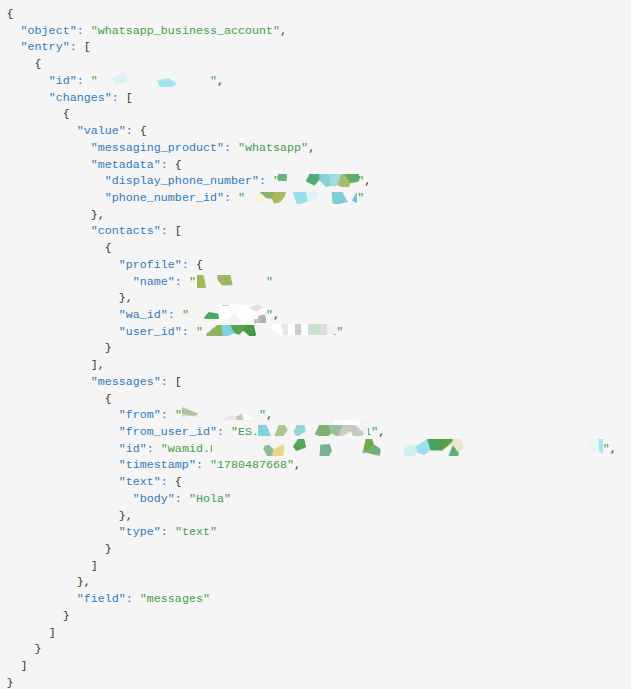
The following payload is an example of what indigitall sends to the configured webhook.
Data Flow Architecture
The following diagram describes the lifecycle of a message and its status updates when using Passthrough:
- Outbound Path: Your backend sends the payload to indigitall, which authorizes and hands it off to Meta.
- Delivery Path: Meta delivers the message to the User.
- Feedback Loop (Status): When the message is delivered or read, Meta sends a webhook to indigitall, which we immediately forward to Your Webhook.
- Inbound Path (User Reply): When a user replies, the message travels from Meta to indigitall, and then directly to Your Webhook.
| Step | Direction | Action | Format |
|---|---|---|---|
| 1 | Client → indigitall | Request to send message | indigitall API |
| 2 | indigitall → Meta | Delivery request | Meta Internal |
| 3 | Meta → User | Message received on phone | WhatsApp UI |
| 4 | Meta → indigitall | Status update (Delivered/Read) | Meta Webhook |
| 5 | indigitall → Client | Forwarding Status/Inbound | Raw Meta Webhook Payload |
Implementation Checklist
- Endpoint Ready: Your webhook endpoint is live and returns 200 OK.
- SSL/TLS: Your endpoint is secured via HTTPS.
- API Keys: You have your indigitall AppKey for outbound messaging.
Opt-Out
To learn how to technically configure the marketing opt-out button in your console and handle the specific event logic, please refer to our detailed Opt-Out Setup Guide.
FAQ
- Can I use the indigitall dashboard to reply to customers in Passthrough mode?
No. In Passthrough mode, the indigitall Contact Center is disabled. All replies must be handled by your own software or CRM using the API. - Why am I not receiving messages at my webhook? Ensure your endpoint is public, supports HTTPS, and returns a 200 OK response. Also, verify that the URL is correctly configured in your indigitall account settings.
- Do I need to follow the Meta format for incoming messages? Yes. indigitall forwards the raw data from Meta to ensure you have access to all original metadata. You should follow the Official Meta Documentation to parse these messages.
Updated 4 months ago