
Background Location Fix
If your mobile application uses Location-Based Push Notifications or Geofencing, you must comply with Google’s Prominent Disclosure policy. Failure to do so will result in your app being rejected or removed from the Google Play Store.
Google requires that any app accessing location in the background (BACKGROUND_LOCATION) must inform the user before the system permission dialog appears. You cannot simply rely on the standard Android pop-up; you must provide your own explanation first.
The Prominent Disclosure Requirement
Before your app requests location permissions, you must display an internal dialog (modal) or a dedicated screen that meets these criteria:
- Visibility: It must be shown in the main flow of the app, not hidden in menus or settings.
- Clear Language: It must include the word "location".
- Background Mention: It must explicitly state that location is used "even when the app is closed or not in use."
- Feature Explanation: Describe the specific benefit (e.g., "to send you nearby offers" or "to trigger security alerts based on your zone").
Correct Example
"This app collects location data to enable [Feature Name] even when the app is closed or not in use. This data is also used to support advertising/functionality."
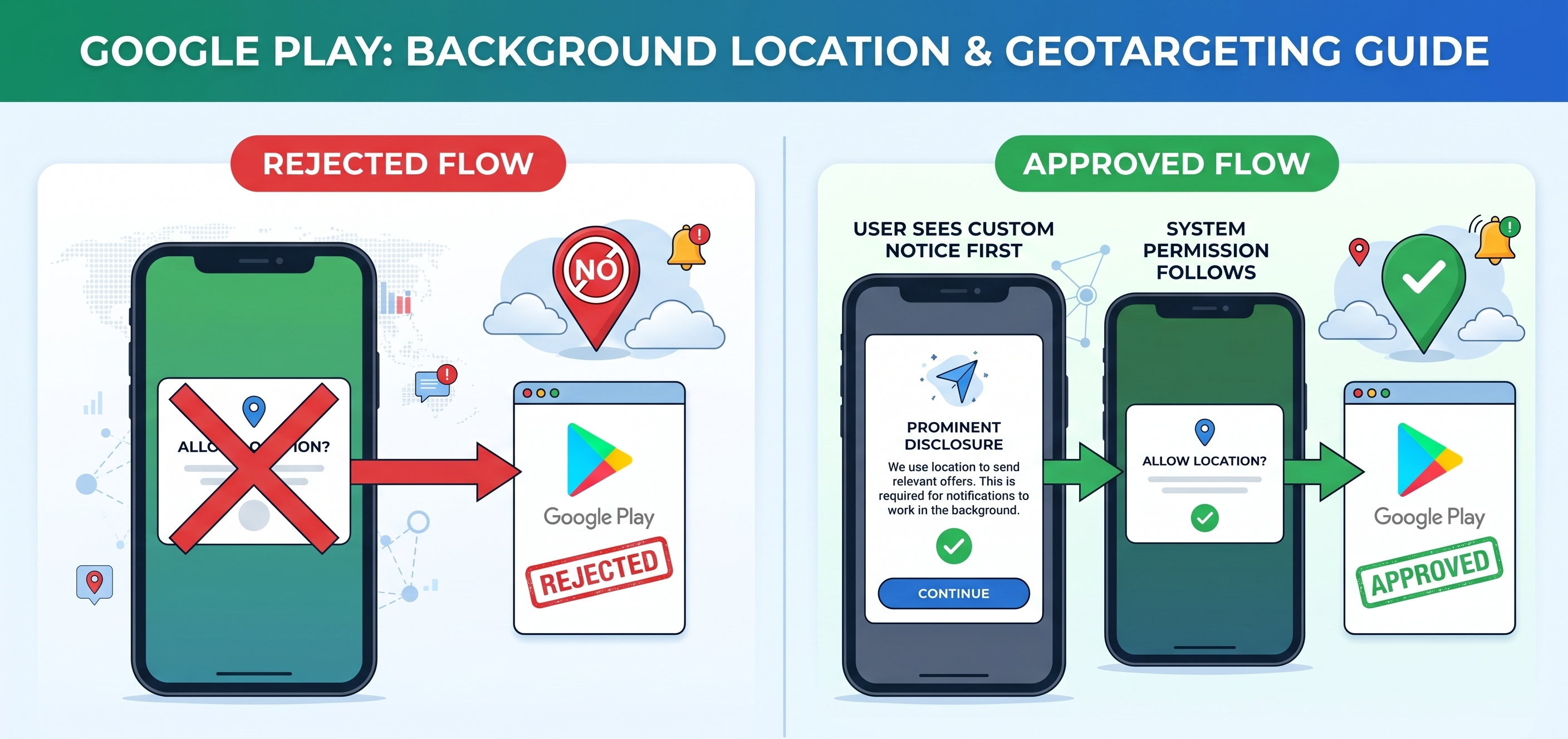
Technical Implementation Flow
To ensure compliance, your development team should follow this sequence:
- Prominent Disclosure: Show your custom message explaining why location is needed.
- User Consent: The user clicks an "Accept" or "I understand" button.
- System Request: Only after the user accepts your message, trigger the official Android permission dialog.
- SDK Activation: The indigitall SDK begins tracking location only after both permissions are granted.
Submitting to Google Play Console
When uploading your App Bundle, you must complete the Location Permissions Declaration. This is a manual review process by Google.
Key Submission Requirements:
- The Justification: Explain clearly why your app's core feature cannot work with "foreground-only" location. If it's a delivery app or a geofencing-based marketing app, state this clearly.
- The Video Link: You must provide a link to a short video (e.g., an unlisted YouTube video) showing:
- The user navigating the app.
- The Prominent Disclosure appearing.
- The system permission being granted.
- The feature working as intended.
Common Reasons for Rejection
To avoid delays in your release, check that your app does NOT do the following:
- Showing the disclosure only inside the Privacy Policy (it must be a separate notice).
- Accessing background location without a clear, user-facing feature.
- Failing to provide an "Unrestricted" battery setting recommendation for users who need high-accuracy tracking.
Summary Checklist
- In-App Notice: Does it explain background usage clearly?
- Privacy Policy: Does it explicitly mention location data collection?
- Video Proof: Do you have a screen recording of the consent flow?
- Play Console Form: Have you justified why background access is essential for your use case?
By following these steps, you ensure that your location-based campaigns reach your users without interruption and that your app remains compliant with global privacy standards.
Tips for Success
- Privacy Policy: Ensure your URL in the Play Console specifically mentions background location data collection.
- Battery Optimization: Remind users to set the app to "Unrestricted" in their device battery settings for the most accurate geofencing results.
- Incremental Requests: Ask for "Foreground Location" first, and only ask for "Background Location" when the user interacts with a feature that truly requires it.
Updated 6 months ago