
What do you need for integration?
- An account to access into indigitall console. If you don't have it, please contact with us here.
- The next thing is to have a project associated with the application web (web browsers) and / or mobile (android, ios). See more details here.
It is important since the project contains the configuration data of your application, that is, the domain where your website is hosted, the safari or iOS certificates or the firebase key that android uses. It all depends on the platforms (web or app) that the project uses.
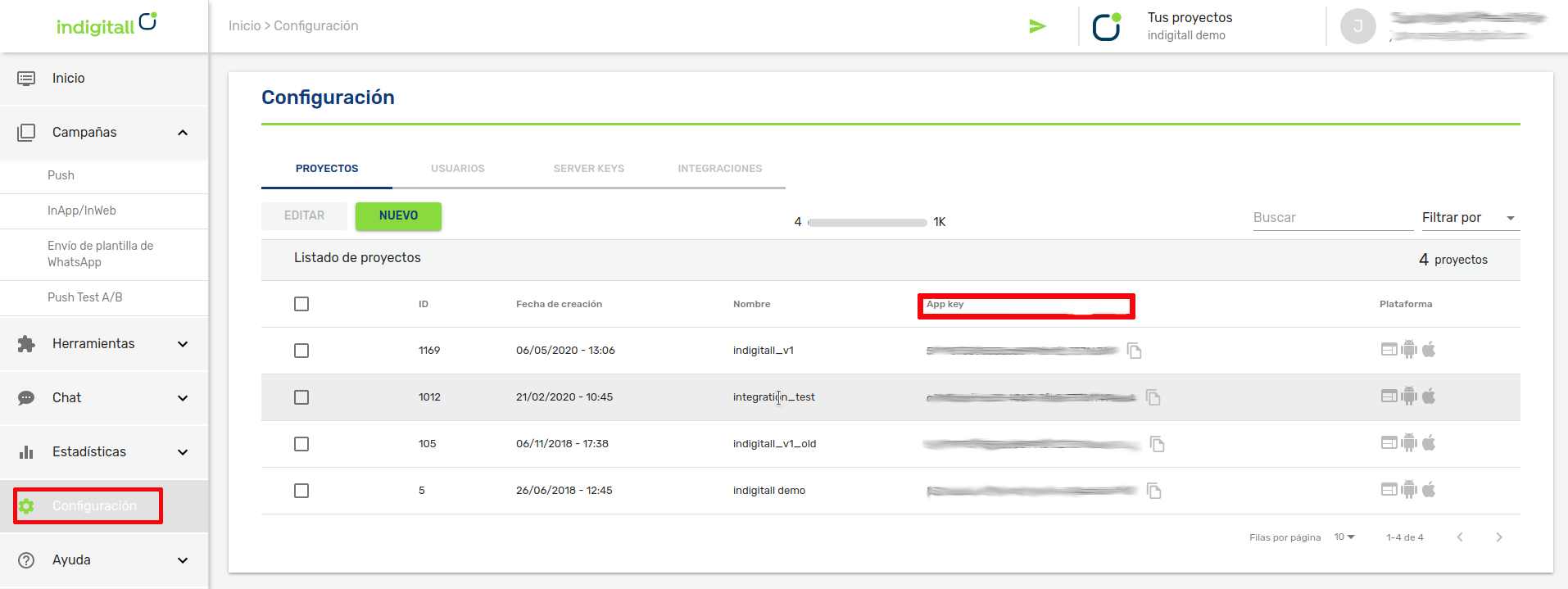
- You will need the App Key of the project, which is the key that our system uses to identify it, so it is unique for each project. You can find it in the administration console within the Configuration section in the Projects tab. You can see it in the following image, and to copy it, it is easy to click on the icon next to the key (App Key)
- For android
- A Firebase Server Key
- A HMS Push Kit Server Key
- Android Studio
- An Android device or emulator with Google Play services installed to run the app
- For iOS
- A valid push certificate for iOS. Learn how to get the push certificate from APNS
- Xcode
- An iOS device to run the app
Integration
This article shows the minimum development that must be done to start registering devices and being able to carry out the first push campaigns.
Our SDK is **available through NuGet.
NuGet it is a package management system. It consists of a command line client and an online database of public and private packages.
Import the plugin
To add our SDK to your project through NuGet you have to look for the Com.Indigitall.Maui package.
You have to use .NET 7.0
Add this package to your project (PCL, Android and iOS) as follows:
🤖 Click to expand AI Integration Prompt (ChatGPT / Copilot / Claude)
Copy and paste this prompt into your AI assistant to accelerate your integration:
# Prompt to implement indigitall push in .NET MAUI (Com.Indigitall.Maui)
Use this prompt as-is to guide a developer through implementing the indigitall push notifications plugin in a .NET MAUI client app.
## Objective
Correctly implement the `Com.Indigitall.Maui` plugin in a .NET MAUI client project, with Android/iOS support and optionally location and HMS (Huawei).
Local context note: this repository contains the `sdk.Maui` folder, but on the client side the integration is done in their `.csproj`.
## Execution rules
1. Apply minimal and safe changes.
2. Do not add noisy logs or unnecessary data.
3. Keep the implementation clean and verifiable.
4. If something is optional (private cloud, location, HMS), only add it when the user confirms.
## Mandatory questions for the user (before touching any code)
Ask for these answers and do not proceed until you have them:
1. indigitall `AppKey`.
2. Firebase `SenderId`.
3. Whether they use a private cloud:
- If `yes`, ask for `UrlDeviceApi`.
- If `no`, do not add `UrlDeviceApi` in the configuration.
4. Whether they want to enable location (`yes/no`).
5. Whether they want to add Huawei HMS services (`yes/no`).
## Step 1. Add NuGet package in the client csproj
In the client app's `.csproj`, add:
```xml
```
## Step 2. SDK initialization (clean code and logs)
Implement or adapt an initialization class with this pattern (keep logs compact and useful):
```csharp
using System;
using Com.Indigitall.Maui;
using Com.Indigitall.Maui.Push.Models;
public class IndigitallInitializer
{
public INDMDevice CurrentDevice { get; private set; }
public void Initialize(
string appKey,
string senderId,
bool requestLocation,
string urlDeviceApi = null)
{
var config = new MPushConfiguration
{
AppKey = appKey,
SenderId = senderId,
RequestLocation = requestLocation,
LogDebug = INDMLogLevel.DEBUG
};
if (!string.IsNullOrWhiteSpace(urlDeviceApi))
{
config.UrlDeviceApi = urlDeviceApi;
}
# if ANDROID
config.DefaultActivity = MainActivity.GetMainActivityString();
# endif
Indigitall.Init(config, OnInitSuccess, OnNewTokenReceived, OnInitError);
}
private void OnInitSuccess(object permissions, INDMDevice device)
{
CurrentDevice = device;
Console.WriteLine($"[Indigitall] Init OK | deviceId={device?.DeviceId} | token={device?.PushToken}");
}
private void OnNewTokenReceived(INDMDevice device)
{
CurrentDevice = device;
Console.WriteLine($"[Indigitall] Token updated | token={device?.PushToken}");
}
private void OnInitError(int code, string error, string description)
{
Console.WriteLine($"[Indigitall] Init ERROR | code={code} | error={error} | description={description}");
}
public void SetDeviceFromToken(object device)
{
if (device is INDMDevice indmDevice)
{
CurrentDevice = indmDevice;
Console.WriteLine($"[Indigitall] Token registered | token={indmDevice.PushToken}");
}
}
}
```
Notes:
- Non-essential extra information is removed.
- If user login is needed (`Indigitall.LogIn`), do it in an explicit business step, not in the base init.
## Step 3. Android: Manifest and base permissions
In `Platforms/Android/AndroidManifest.xml`, ensure the following elements are present:
```xml
```
## Step 5. Android optional: HMS (Huawei)
Only if the user answered yes.
### 5.1 MainActivity
Add to `MainActivity`:
```csharp
protected override void AttachBaseContext(Context context)
{
base.AttachBaseContext(context);
AGConnectServicesConfig config = AGConnectServicesConfig.FromContext(context);
config.OverlayWith(new HmsLazyInputStream(context));
}
```
And also:
```csharp
public override void OnRequestPermissionsResult(int requestCode, string[] permissions, Permission[] grantResults)
{
new Com.Indigitall.Maui.Platforms.Android.MIndigitall()
.OnRequestPermissionsResult(requestCode, permissions, grantResults);
}
```
### 5.2 HmsLazyInputStream class
Create `HmsLazyInputStream.cs` (adjust to the project's actual namespace):
```csharp
using System;
using System.IO;
using Android.Content;
using Android.Util;
using Com.Huawei.Agconnect.Config;
namespace XamarinDemo.Droid
{
public class HmsLazyInputStream : LazyInputStream
{
public HmsLazyInputStream(Context context) : base(context)
{
}
public override Stream Get(Context context)
{
try
{
return context.Assets.Open("agconnect-services.json");
}
catch (Exception e)
{
Log.Error(e.ToString(), "Can't open agconnect file");
return null;
}
}
}
}
```
### 5.3 AndroidManifest HMS
Add:
```xml
```
### 5.4 HMS/Gradle verifications
Check that:
- `agconnect-services.json` exists in `Platforms/Android/Assets`.
- `google-services.json` exists in `Platforms/Android/Assets`.
- Required HMS dependencies/plugins are resolved by the package or by project configuration.
- If anything is not resolved automatically, document it and add the specific Gradle/HMS configuration required by the client environment.
## Step 6. iOS: AppDelegate and notification delegate
### 6.1 AppDelegate
Ensure:
```csharp
UNUserNotificationCenter.Current.Delegate = new UserNotificationCenterDelegate();
```
Add/adjust exported methods:
```csharp
[Export("application:handleActionWithIdentifier:forRemoteNotification:withResponseInfo:completionHandler:")]
public void HandleAction(
UIApplication application,
string actionIdentifier,
NSDictionary remoteNotificationInfo,
NSDictionary responseInfo,
Action completionHandler)
{
Com.Indigitall.Maui.Platforms.iOS.MIndigitall.HandleActionPush(
remoteNotificationInfo,
actionIdentifier,
(push, action) =>
{
Console.WriteLine($"[Indigitall][iOS] HandleAction | action={action?.App}");
});
}
[Export("application:didRegisterForRemoteNotificationsWithDeviceToken:")]
public void RegisteredForRemoteNotifications(UIApplication application, NSData deviceToken)
{
Com.Indigitall.Maui.Platforms.iOS.MIndigitall.SetDeviceToken(deviceToken, device =>
{
Console.WriteLine($"[Indigitall][iOS] Token registered | token={device?.PushToken}");
});
}
[Export("application:didFailToRegisterForRemoteNotificationsWithError:")]
public void FailedToRegisterForRemoteNotifications(UIApplication application, NSError error)
{
Console.WriteLine($"[Indigitall][iOS] Token registration error | {error?.LocalizedDescription}");
}
```
### 6.2 UNUserNotificationCenterDelegate class
Create the class extending `UNUserNotificationCenterDelegate`:
```csharp
using System;
using Foundation;
using UserNotifications;
public class UserNotificationCenterDelegate : UNUserNotificationCenterDelegate
{
public UserNotificationCenterDelegate()
{
}
public override void WillPresentNotification(
UNUserNotificationCenter center,
UNNotification notification,
Action completionHandler)
{
Com.Indigitall.Maui.Push.Platforms.iOS.MIndigitallPush.WillPresentNotification(completionHandler);
}
public override void DidReceiveNotificationResponse(
UNUserNotificationCenter center,
UNNotificationResponse response,
Action completionHandler)
{
IndigitallPushMaui.PushIndigitall.HandleWithResponse(response, (push, action) =>
{
Console.WriteLine($"[Indigitall][iOS] NotificationResponse | action={action?.App}");
});
completionHandler();
}
}
```
## Step 7. iOS: Notification Service Extension
Add a Notification Service Extension with this content:
```csharp
using System;
using Foundation;
using UserNotifications;
namespace Notification
{
[Register("NotificationService")]
public class NotificationService : UNNotificationServiceExtension
{
Action ContentHandler { get; set; }
UNMutableNotificationContent BestAttemptContent { get; set; }
UNNotificationRequest Request { get; set; }
protected NotificationService(IntPtr handle) : base(handle)
{
}
public override void DidReceiveNotificationRequest(
UNNotificationRequest request,
Action contentHandler)
{
ContentHandler = contentHandler;
BestAttemptContent = (UNMutableNotificationContent)request.Content.MutableCopy();
Request = request;
Com.Indigitall.Maui.Platforms.iOS.MIndigitall.DidReceiveNotificationRequest(Request, ContentHandler);
}
public override void TimeWillExpire()
{
if (ContentHandler != null && BestAttemptContent != null)
{
Com.Indigitall.Maui.Platforms.iOS.MIndigitall.TimeWillExpire(BestAttemptContent, ContentHandler);
}
}
}
}
```
## Paso 8. iOS capabilities y configuración
Verificar en el target app y en la extensión lo necesario:
1. `Push Notifications` habilitado.
2. `Background Modes` habilitado con:
- `Remote notifications`
- `Background fetch`
3. Entitlements alineados con el Bundle ID correcto.
4. Si se usa CocoaPods para nativo iOS, actualizar repositorio de pods antes de compilar para asegurar última versión nativa requerida por el plugin.
Si el usuario pidió localización, añadir además:
- Claves de permisos de ubicación en `Info.plist` (`WhenInUse` y/o `Always`, según política de la app).
- Texto claro de justificación de uso.
## Paso 9. Validaciones finales (obligatorio)
1. Compila Android e iOS sin errores.
2. Verifica inicialización correcta y recepción de token.
3. Envía push de prueba y confirma recepción en foreground/background.
4. Si HMS está activo, validar recepción de push HMS en dispositivo Huawei.
5. Si localización está activa, validar permisos y callback funcional.
6. Confirmar que no se imprimen logs innecesarios ni datos sensibles.
## Criterio de entrega
La implementación se considera finalizada cuando:
- Está agregado `Com.Indigitall.Maui` en el `.csproj` cliente.
- La inicialización usa los valores confirmados por usuario.
- Android/iOS (y opcionales solicitados) quedan implementados y compilando.
- Se documenta brevemente cualquier ajuste adicional requerido por entorno (Gradle/HMS/CocoaPods).
---
Documentación oficial (añadida al final, como solicitado):
https://documentation.indigitall.com/reference/initial-sdk-setup-8
> ⚠️ AI can make mistakes. Always verify everything it does before treating it as valid.
This integration has been done with the IDE Visual Studio.